Screen Printing Workshop first test: Difference between revisions
From PS:1 Wiki Dev
Jump to navigationJump to search
Content deleted Content added
m 5 revisions |
m Robot: Cosmetic changes |
||
| Line 1: | Line 1: | ||
| ⚫ | |||
== Intro == |
== Intro == |
||
On February 18, 2009 I made my first attempt at creating a screen using Diazo photo emulsion from Speedball. |
On February 18, 2009 I made my first attempt at creating a screen using Diazo photo emulsion from Speedball. Details to follow. --[[User:Nathaner|Nathan]] |
||
== Preparation == |
== Preparation == |
||
| Line 12: | Line 11: | ||
* Speedball 10" squeegee |
* Speedball 10" squeegee |
||
* NOTE: It would have been good to invest in a scoop coater as well |
* NOTE: It would have been good to invest in a scoop coater as well |
||
* Flat, heavy materials. |
* Flat, heavy materials. I went with ''Flash MX Bible'', ''Visual Basic 6 Black Book'', ''SAMS Visual C++ 6'', ''SAMS Teach Yourself LAMP'' & ''Basic Electronics'' text book. |
||
* Clothes you're not worried about ruining |
* Clothes you're not worried about ruining |
||
* Patience |
* Patience |
||
| Line 18: | Line 17: | ||
== Application == |
== Application == |
||
* Diazo photo emulsion kit requires mixing sensitizer (Black) into the base emulsion (Blue) to activate. |
* Diazo photo emulsion kit requires mixing sensitizer (Black) into the base emulsion (Blue) to activate. Do so and mix vigorously (Resulting mixture turns green.) |
||
** Directions state emulsion can last for up to 4 months when stored in refrigerator. |
** Directions state emulsion can last for up to 4 months when stored in refrigerator. |
||
* Carefully applied emulsion to both sides of screen with Speedball squeegee. |
* Carefully applied emulsion to both sides of screen with Speedball squeegee. This is where I could have made less mess with a scoop coater. |
||
* After checking that both sides were coated as evenly as possible I '''IMMEDIATELY''' took the screen to dry in a dark arrid place. |
* After checking that both sides were coated as evenly as possible I '''IMMEDIATELY''' took the screen to dry in a dark arrid place. In my case I used my oven (no heat necessary). According to instructions, dry the screen with the flat side down, but elevated. |
||
** screen appeared to be perfectly dry in 1 hour, could have gone with 45 minutes probably. |
** screen appeared to be perfectly dry in 1 hour, could have gone with 45 minutes probably. |
||
* Do not expose screen to light until you are ready for printing. |
* Do not expose screen to light until you are ready for printing. This is why I need to build a drying box. |
||
== Exposure == |
== Exposure == |
||
* I burned the screen for 15 minutes, checked it, uneducated guess is that it needs more time to expose. |
* I burned the screen for 15 minutes, checked it, uneducated guess is that it needs more time to expose. Check again in 15 more minutes. (10:34 PM) |
||
** Now is a good time to note that I should have attached my positive to the screen so when I checked it the alignment wouldn't get messed up. |
** Now is a good time to note that I should have attached my positive to the screen so when I checked it the alignment wouldn't get messed up. |
||
* I decided to let it stay for another 30 that way if it overexposed I would have a high point of reference. |
* I decided to let it stay for another 30 that way if it overexposed I would have a high point of reference. From what little experience I have it doesn't seem to have changed much. The emulsion basically just gets ''slightly'' more transparent. |
||
* After 45 minutes I pulled the screen off the light and washed out the print areas with my high pressure spray nozzle. |
* After 45 minutes I pulled the screen off the light and washed out the print areas with my high pressure spray nozzle. It takes a minute or two for the areas to start clearing out (I was worried) but then slowly they will empty out. |
||
* Letting screen dry completely will I prepare my kitchen table for test prints. |
* Letting screen dry completely will I prepare my kitchen table for test prints. |
||
== Result == |
== Result == |
||
[http://farm4.static.flickr.com/3503/3292457236_d59f36e353.jpg?v=0 My first custom shirt]<br> |
[http://farm4.static.flickr.com/3503/3292457236_d59f36e353.jpg?v=0 My first custom shirt]<br /> |
||
[http://flickr.com/photos/nathaner/tags/screenprintingtest/ Full set on Flickr] |
[http://flickr.com/photos/nathaner/tags/screenprintingtest/ Full set on Flickr] |
||
Came out way better than I could have imagined. |
Came out way better than I could have imagined. Only a few things to note:<br /> |
||
* The color blends into shirt fabric too much. |
* The color blends into shirt fabric too much. This isn't so bad on light colored shirts, but on dark/black it's nearly impossible to see. I'll have to research further on types of ink to use (went with water solvable for this attempt) and step up to multi-color prints at some point. |
||
* A finer screen mesh, which could be a little more expensive, would yield better results on firmer surfaces like paper. |
* A finer screen mesh, which could be a little more expensive, would yield better results on firmer surfaces like paper. |
||
* DEFINITELY need to learn how to stretch my own screens for saving cost. |
* DEFINITELY need to learn how to stretch my own screens for saving cost. |
||
* For future screen burns, I'm thinking of incorporating some kind of test pattern in the corner or my screens that I will mask off at printing time. |
* For future screen burns, I'm thinking of incorporating some kind of test pattern in the corner or my screens that I will mask off at printing time. This will make it easier to check the progress of exposure without compromising the artwork. |
||
| ⚫ | |||
Latest revision as of 00:28, 18 March 2014
Intro
On February 18, 2009 I made my first attempt at creating a screen using Diazo photo emulsion from Speedball. Details to follow. --Nathan
Preparation
Materials:
- Lightbox (with 6 20 watt daylight fluorescent bulbs, distance from screen: ~7"
- 12"x10" Dick Blick screen #94708 (upc:651032 947087)
- Speedball Diazo photo emulsion kit
- Speedball 10" squeegee
- NOTE: It would have been good to invest in a scoop coater as well
- Flat, heavy materials. I went with Flash MX Bible, Visual Basic 6 Black Book, SAMS Visual C++ 6, SAMS Teach Yourself LAMP & Basic Electronics text book.
- Clothes you're not worried about ruining
- Patience
Application
- Diazo photo emulsion kit requires mixing sensitizer (Black) into the base emulsion (Blue) to activate. Do so and mix vigorously (Resulting mixture turns green.)
- Directions state emulsion can last for up to 4 months when stored in refrigerator.
- Carefully applied emulsion to both sides of screen with Speedball squeegee. This is where I could have made less mess with a scoop coater.
- After checking that both sides were coated as evenly as possible I IMMEDIATELY took the screen to dry in a dark arrid place. In my case I used my oven (no heat necessary). According to instructions, dry the screen with the flat side down, but elevated.
- screen appeared to be perfectly dry in 1 hour, could have gone with 45 minutes probably.
- Do not expose screen to light until you are ready for printing. This is why I need to build a drying box.
Exposure
- I burned the screen for 15 minutes, checked it, uneducated guess is that it needs more time to expose. Check again in 15 more minutes. (10:34 PM)
- Now is a good time to note that I should have attached my positive to the screen so when I checked it the alignment wouldn't get messed up.
- I decided to let it stay for another 30 that way if it overexposed I would have a high point of reference. From what little experience I have it doesn't seem to have changed much. The emulsion basically just gets slightly more transparent.
- After 45 minutes I pulled the screen off the light and washed out the print areas with my high pressure spray nozzle. It takes a minute or two for the areas to start clearing out (I was worried) but then slowly they will empty out.
- Letting screen dry completely will I prepare my kitchen table for test prints.
Result
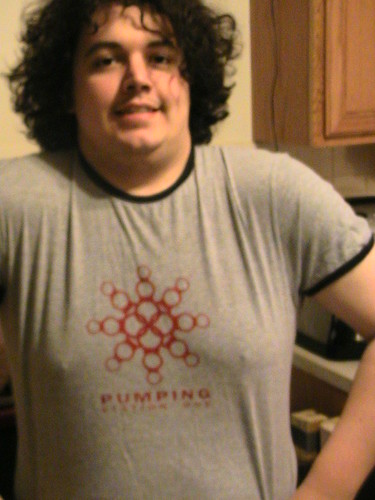
My first custom shirt
Full set on Flickr
Came out way better than I could have imagined. Only a few things to note:
- The color blends into shirt fabric too much. This isn't so bad on light colored shirts, but on dark/black it's nearly impossible to see. I'll have to research further on types of ink to use (went with water solvable for this attempt) and step up to multi-color prints at some point.
- A finer screen mesh, which could be a little more expensive, would yield better results on firmer surfaces like paper.
- DEFINITELY need to learn how to stretch my own screens for saving cost.
- For future screen burns, I'm thinking of incorporating some kind of test pattern in the corner or my screens that I will mask off at printing time. This will make it easier to check the progress of exposure without compromising the artwork.